
All your equipment in one system.
With zamics, you always have a clear overview of your equipment fleet and the inspection dates.

Complete overview on the construction site
Whether on the construction site or in the office – with the zamics app and the desktop view, you always have your work equipment in sight. Our software offers numerous functions for managing your equipment fleet. You can display all devices linked to the system and manage them with filter functions. You can find out more about our features in our tutorials.
- Transparent overview of all locations and devices
- Numerous filter functions for optimised device management
- Customised employee views
Always know exactly where each device is being used—thanks to active tracking.
The system offers you various solutions to organize and locate your equipment. You can set up your equipment manually or link it to zamics using NFC transponders and QR codes. For larger construction projects, we recommend our active tracking solutions, such as GPS trackers or BLE trackers. Contact us – we are happy to advise you.
- Simple assignment of your equipment to locations and people
- Manual and automatic device registration
- Precise metre-level localisation of high-value equipment*
* Additional IoT expenses due to GPS use


All inspections in view
With zamics’ inspection management, you can create regular and one-off inspections and assign them to your devices. This means your equipment is always ready for use and reliable. All important documents and logs can be saved and accessed. The system automatically reminds you of inspection dates. Find out more in our video tutorial “How do I use test management in zamics?“.
- Easy creation of inspections
- Save important data such as inspection documents and images
- Numerous reminder functions and checklists
Continue using your data
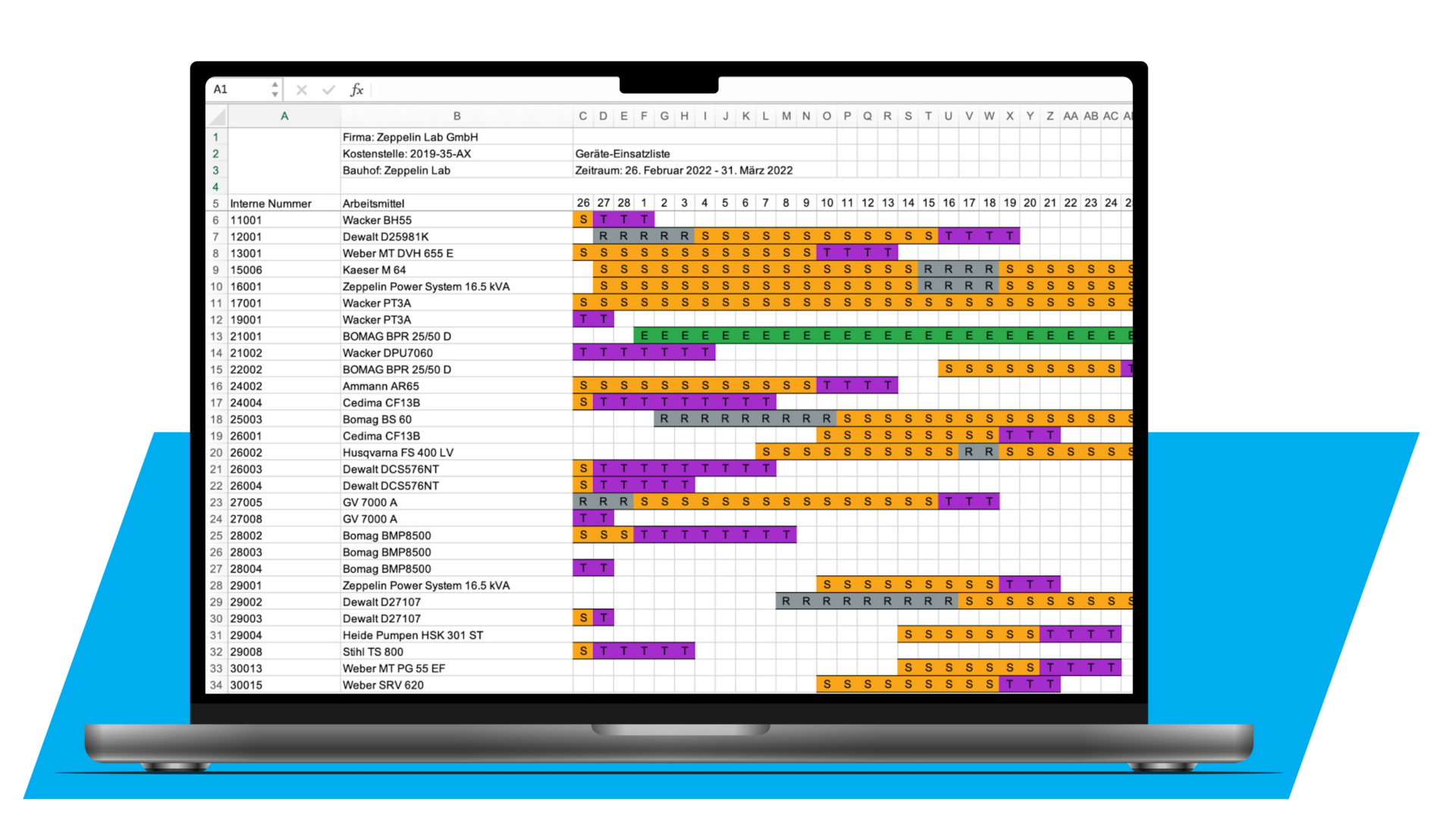
With zamics, you can easily export deployment lists, notifications and inspection dates. All relevant information about your work equipment is clearly displayed in the system. You have the option of saving data, documents and photos. Many useful filter functions help you with specific searches for devices, people or locations.
- Storage functions for required data, documents and images
- Easy export of deployment lists, inspection dates and more
- Clear detail pages, categories and lists for your equipment
Optimising the use of tracking solutions
The zamics system is compatible with a wide range of transponder technologies. Depending on your requirements, your work equipment can be identified using various technologies such as NFC, Bluetooth or GPS and QR codes.
The technologies can be combined as needed. This allows you to see all the stored information about the linked equipment at a glance and manage it directly in the app and on the computer. For example, you can change the location, assign the device to a person, change the status and much more.

Our tracking solutions in comparison
| QR and NFC Transponders | BLE (Bluetooth Low Energy) | Active GPS Sender |
|---|---|---|
| High-quality sticker with NFC chip or customised QR codes with strong adhesive | Active, versatile transponder that is automatically detected. Perfect for automation solutions. | Precise location determination for high-quality work equipment (e.g. application in theft protection) |
| Digital interface | Digital interface | Digital interface |
| No active location tracking | Active location tracking via gateways or smartphone in the vicinity | Sends location independently |
| Can be used anywhere | Ideal indoor | Ideal outdoor |
| Direct contact up to a few centimetres | Several metres within range of gateway or smartphone | Everywhere on the mobile phone network |
| € * | €€ * | €€€ * |
| Type of interface: Read by touch or with the smartphone camera | Type of interface: Automatic readout in the vicinity of smartphones or gateways | Type of interface: Satellite connection to zamics |
* Costs depending on the number of transponders used. Hardware can be obtained from zamics or third-party providers.
** IoT costs relate to the infrastructure for active location tracking.
Do you still have questions?
You can contact us on 0800 / 554 257 322 or book a non-binding product demonstration directly with one of our product experts.
Work with zamics
Loading may transfer data an YouTube. Read more in the Privacy Policy.
Our video tutorials offer you comprehensive video instructions to get started and work with zamics. In short clips our experts show you what is important for setting up zamics and working with the system.
FAQ
Here you will find answers to frequently asked questions. We are also happy to be there for you in person.
How many implements can you create?
In principle, as many equipment as required can be recorded.
In the free trial version you can create up to 25 work tools. After that, there are scales ranging from the entry-level package through, XS, S, M, L and XL to an Enterprise package. Feel free to contact us, we will find the right solution together.
For more information, please see our price overview.
Can I export data from zamics?
Yes. We offer import and export of data as CSV file. This is possible for both employees and equipment.
Can operating hours also be recorded?
Not at the moment. However, since we know from experience that this is of interest to many companies in the market, we are working flat out to integrate it into the zamics system.
Can I see the exact location of my machine?
You can see at which location your equipment was checked in. With NFC, the data is based on the manual process of recording your employees. With Bluetooth, this process is automatic. Locating with meter accuracy is not possible in either case. However, we know that this is very relevant for many companies, for example due to theft protection. That is why we are working on a suitable solution.
– More information in the FAQ video (YouTube)
How does zamics help me keep track of testing dates?
In the zamics overview, all test dates are prominently and clearly displayed. In addition, the status is marked in color – missed appointments, for example, are clearly highlighted in red. In addition, you will receive monthly reminders of all upcoming appointments by mail.